Request a refund
Refund your own tickets from your order page, if the organizer allows refunds.
Each organizer sets their own refund policy. It’s shown on the event page.
- Open your tickets from your confirmation email, or through Find my tickets.
- Scroll to Refunds. It says how many tickets can be refunded.
- Tick the tickets you want to refund, tap Refund N tickets, then tap Confirm refund.
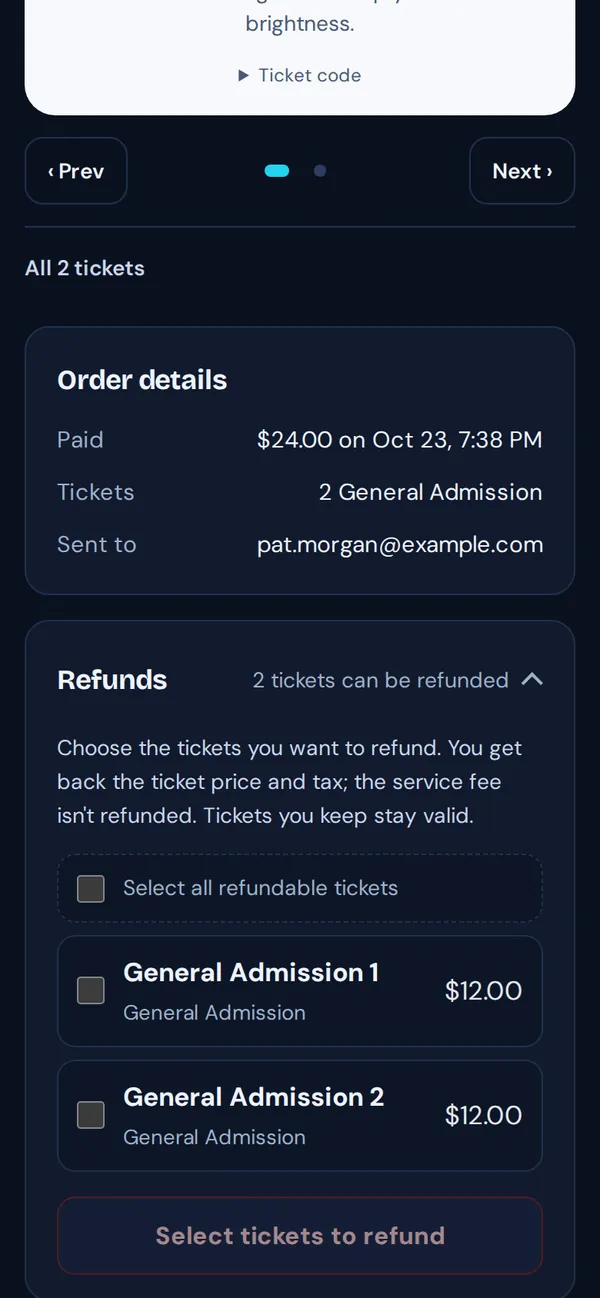
- You get back the ticket price and any tax. The service fee isn’t refunded.
- Tickets you keep stay valid.
- The money goes back to the card you paid with. Banks usually take 5–10 business days to show it.
- If the event is canceled, you’ll get an email explaining your refund.
Good to know: Says “All sales are final”, or you’re past the deadline? Contact the organizer. Their details are on the event page.